> ## Documentation Index
> Fetch the complete documentation index at: https://docs.geogen.io/llms.txt
> Use this file to discover all available pages before exploring further.
# #1 Adding an Entity
> Ready to see where your brand stands in the world of AI search? GeoGen is the clearest path to knowing.
We show you exactly what happens when people ask AI assistants about your industry, your products, and your competitors. Getting started is straightforward: just set up your company profile, add the questions your customers are asking, and let GeoGen get to work.
Our platform interacts with AI models the same way a person does, by using their public websites. This guarantees the data you see is authentic and truly reflects the live user experience.
After you complete the quick setup, you’ll have your first report showing precisely how your brand is appearing across the AI landscape.
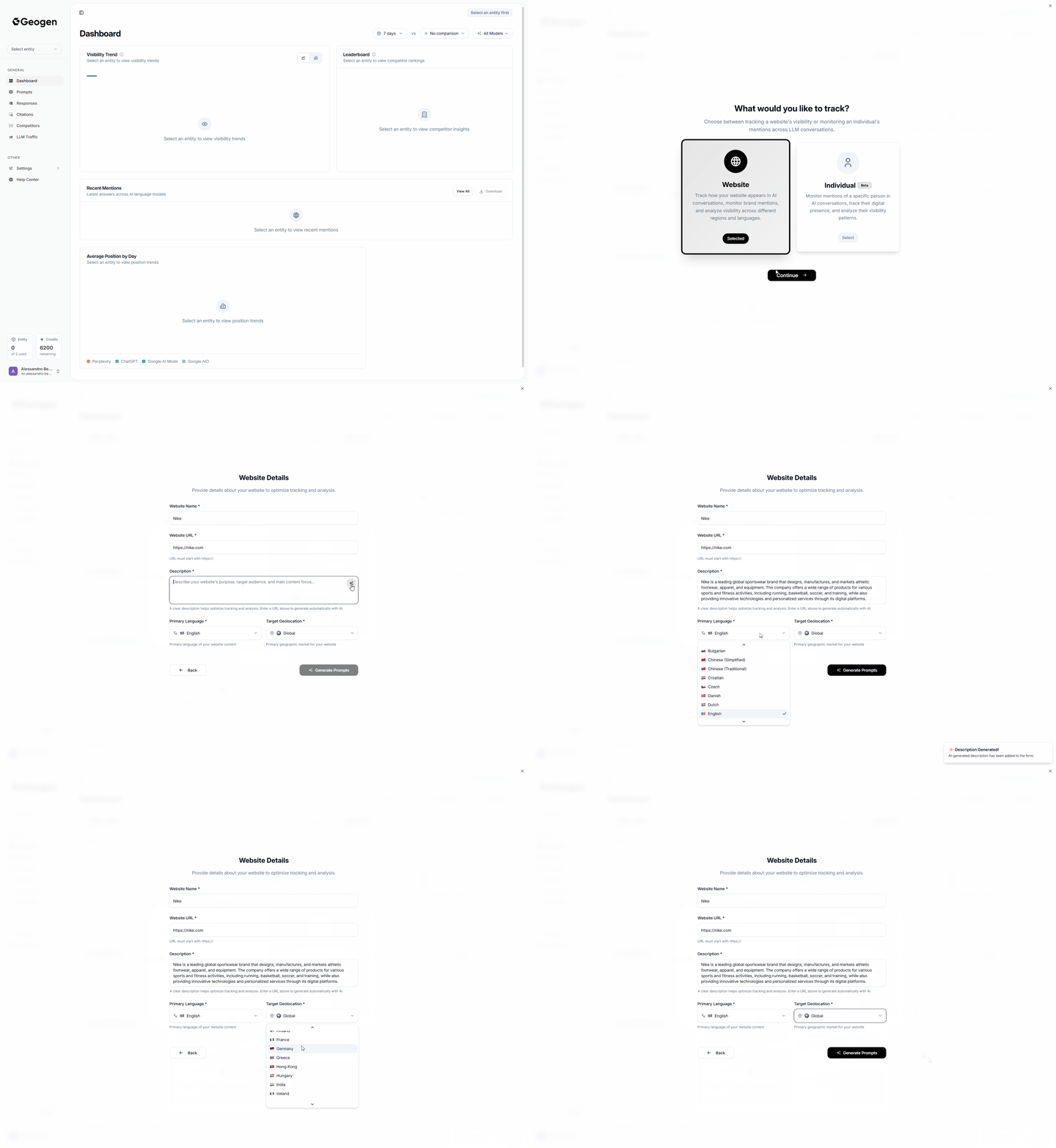 1. Click on **Select Entity** on the top left menu
2. Select **Add New Tracking**
3. Select **Website** (Default) or Individual (Beta)
4. Fill the **Website Name** field with your Company/Brand Name
5. Fill the **Website URL** field with your Company/Brand URL
6. **Create a Description for your Company/Brand (See Instructions Below)**
\
Click the Sparkles Icon on at the Top-Right of the Description Field to have AI Crawl and Understand your Company/Brand and write a Description for it.
Bare in mind that depending on your website structure, the Description Generated by AI may not be the most optimal for AI generated prompts afterwards, but it may be a good starting point, further tweak if necessary highlighting clearly the product/services offered by your company.
\
**Instruction:**
Enter a concise company + offering summary to improve prompt accuracy.
**Format:**
\[COMPANY NAME] provides/offers \[PRODUCT(S)/SERVICE(S)] \[in REGION(S) if applicable].
**Examples:**
* • Acme Solar provides residential solar installation and maintenance.
* • NordicFoods offers frozen vegan meals in Scandinavia.
* • ByteGuard provides cybersecurity audits and managed SOC services.
* • MedTour offers medical concierge services in the Gulf region.
**Tip:**
One sentence. Plain names, no slogans. Region only if it truly matters.
1. Click on **Select Entity** on the top left menu
2. Select **Add New Tracking**
3. Select **Website** (Default) or Individual (Beta)
4. Fill the **Website Name** field with your Company/Brand Name
5. Fill the **Website URL** field with your Company/Brand URL
6. **Create a Description for your Company/Brand (See Instructions Below)**
\
Click the Sparkles Icon on at the Top-Right of the Description Field to have AI Crawl and Understand your Company/Brand and write a Description for it.
Bare in mind that depending on your website structure, the Description Generated by AI may not be the most optimal for AI generated prompts afterwards, but it may be a good starting point, further tweak if necessary highlighting clearly the product/services offered by your company.
\
**Instruction:**
Enter a concise company + offering summary to improve prompt accuracy.
**Format:**
\[COMPANY NAME] provides/offers \[PRODUCT(S)/SERVICE(S)] \[in REGION(S) if applicable].
**Examples:**
* • Acme Solar provides residential solar installation and maintenance.
* • NordicFoods offers frozen vegan meals in Scandinavia.
* • ByteGuard provides cybersecurity audits and managed SOC services.
* • MedTour offers medical concierge services in the Gulf region.
**Tip:**
One sentence. Plain names, no slogans. Region only if it truly matters.